Eco Bytes |
[home] |
Navigation
Analytical temperature display with the LM34
18 September 2014 [This page was recovered from the TheStuffWeBuild WordPress Archive and adapted for this site in 2025.]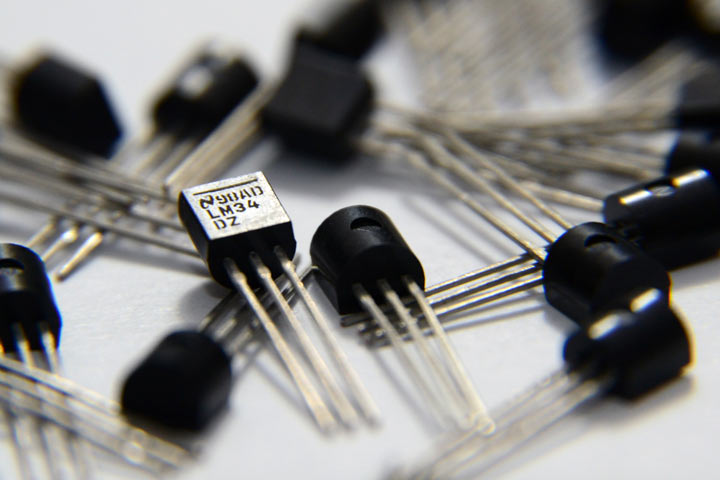
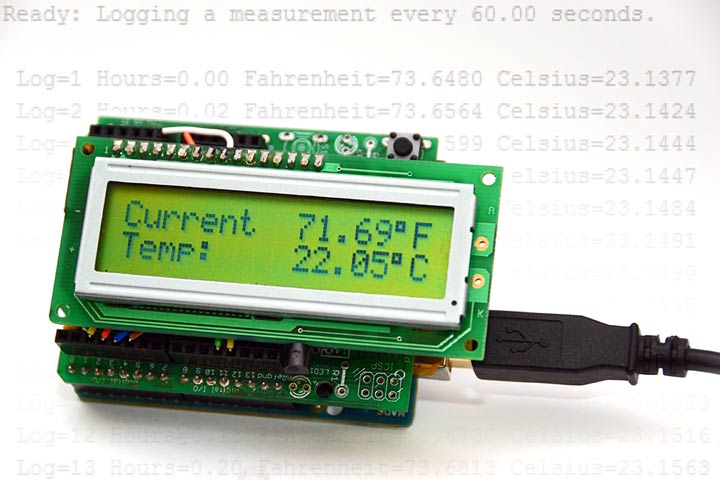
Now make it!
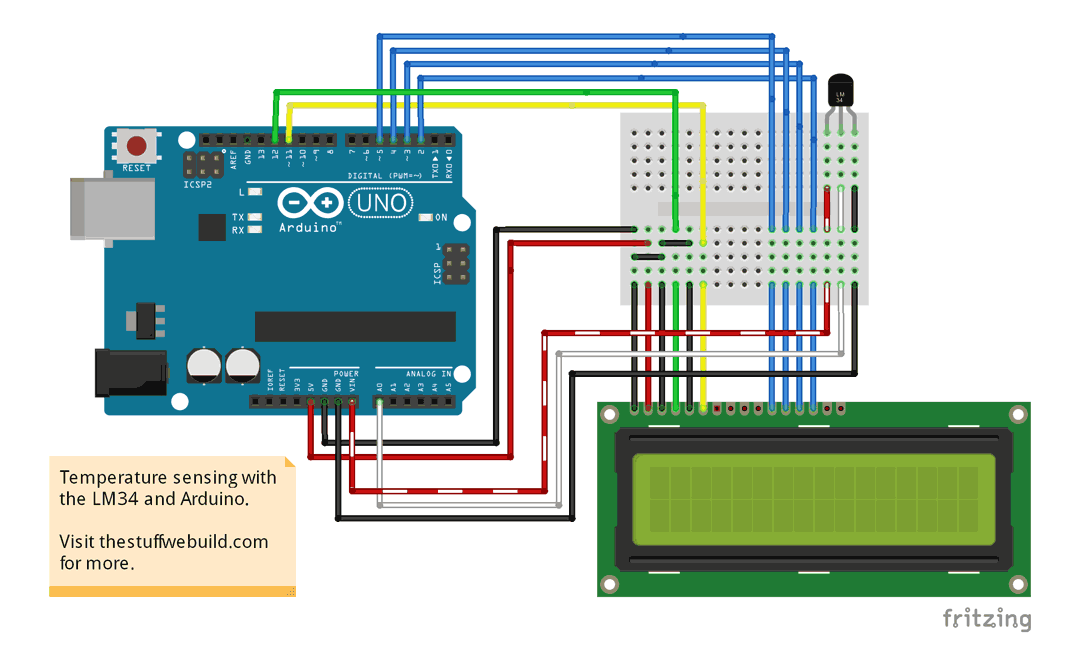
Weather being powered from USB or battery, you'll want to connect the Vcc pin (left) of the LM34 to the Vin pin of the Arduino. Also join the grounds (right). This sensor can handle up to 30 volts DC, so you shouldn't have to worry about the input voltage. The Vout pin (middle) of the LM34 should be connected to an analog pin of the Arduino, in our case we will use A0. If you want an LCD readout of the temperature, connect a 16x2 character LCD of your choice to the Arduino as per most LCD tutorials (12, 11, 5, 4, 3, 2).
Source code
Feel free to change some variables and experiment! This sketch's somewhat descriptive comments should help you understand what's going on.
/*
 * This is a simple LCD thermometer that displays the temperature in
 * Fahrenheit, Celsius, and/or Kelvin on both an 16x2 LCD and through serial.
 * It uses the LM34 Precision Fahrenheit Temperature Sensor which outputs a
 * linear DC voltage relative to its temperature. (720mV = 72.0°F).
 *
 * We are using the internal analog reference of 1.1v to improve our
 * resolution at the cost of range. Consequently, our temperature range
 * becomes 0°F to 110°F (-17°C to 43°c), which is perfect for most uses.
 *
 * We can't read negative voltages on the analog pin, so if we use the LM35
 * Precision Celsius Temperature Sensor (and alter the float math variables),
 * our range will become 32°F to 230°F (0°C to 110°c).
 *
 * Visit thestuffwebuild.com for more.
 */

// We need the lcd library
#include <LiquidCrystal.h>

// Setup lcd pins
LiquidCrystal lcd(12, 11, 5, 4, 3, 2);

// Serial-log a measurement every 'this many' milliseconds
//long interval = 0; //log asap (~22500 measurements an hour)
//long interval = 2000; //1800 measurements an hour
//long interval = 10000; //360 measurements an hour
long interval = 60000; //60 measurements an hour
//long interval = 3600000; //1 measurement an hour


// This is how many samples you will average per measurement.
// Hint: if this is set at or near 1, you will have a slow recovery time.
unsigned long samples = 1000;

// Running-average factor; 1=disabled; approaching 0 means more averaging
float alpha = 0.01;

// Set our analog reference voltage constant
float vRef = 1.1;

// Variable used for counting the samples for running average
int count;

// AnalogRead variable
int a;

// Running averaged analog variable
float ra;

// Output variables
float v, f, c, k;

// Time alive variables (max ~50 days ea. till overflow)
float h, m;

// Variable used to count how many measurements we have taken
unsigned long n;

// Variable to display the logging interval in seconds at startup
float intervaltosec;

// Variables used for timing the logging interval
unsigned long currentMillis;
unsigned long previousMillis;

// Used to make sure we have enough time to measure and write to the LCD
unsigned long dlyconst;

// Variable used to subtract setup time from logging time.
float ttb;

// We'll use the internal LED 13 to tell us when we are sampling
int led = 13;


//////////////////////////////////////////////////////////////////////////////
////////////////////////////// setup procedure ///////////////////////////////
//////////////////////////////////////////////////////////////////////////////
void setup() {

  // Set aRef to internal 1.1v
  analogReference(INTERNAL);
  // Sample A0 once to initialize new aRef.
  analogRead(0);

  // Again, we'll use the internal LED for debugging, set it as an output
  pinMode(led, OUTPUT);

  // Start serial
  Serial.begin(9600);

  // Start lcd
  lcd.begin(16, 2);

  // Write these lines to lcd
  // Note: the F("...") keeps the string in flash.
  lcd.setCursor(0, 0);
  lcd.print(F("Current"));
  lcd.setCursor(0, 1);
  lcd.print(F("Temp:"));

  // Convert interval milliseconds to seconds
  intervaltosec = interval / 1000.0;

  // Print what we are doing and that we are ready
  Serial.print(F("Ready: Logging a measurement every "));
  Serial.print(intervaltosec);
  Serial.println(F(" seconds."));
  Serial.println();

  // See how long it took to boot up
  ttb = millis();

  // Determine the time required to measure and use the LCD
  dlyconst = samples / 12;
}

///////////////////////////////////////////////////////////////////////////////
////////////////////////////// logging procedure //////////////////////////////
///////////////////////////////////////////////////////////////////////////////
void logging(){

  // Add one to "n"
  n++;

  // Calculate number of minutes alive (hijack "currentMillis" for accuracy)
  m = (currentMillis - ttb) / 60000.00;

  // Calculate number of hours alive
  h = m / 60.00;

  // Serial print all values
  // Hint: for logging, you can comment in or out strings you want/don't want.

  // Number of logged measurements
  Serial.print(F(" Log="));
  Serial.print(n);

  // Minutes alive
  //Serial.print(F(" Minutes="));
  //Serial.print(m, 2);

  // Hours alive
  Serial.print(F(" Hours="));
  Serial.print(h, 2);

  // Raw analog value
  //Serial.print(F(" Raw_analog="));
  //Serial.print(a);

  // Running average analog value
  //Serial.print(F(" Avgeraged_analog="));
  //Serial.print(ra, 4);

  // Volts on analog pin
  //Serial.print(F(" Voltage="));
  //Serial.print(v, 4);

  // Fahrenheit
  Serial.print(F(" Fahrenheit="));
  Serial.print(f, 4);

  // Celsius
  Serial.print(F(" Celsius="));
  Serial.print(c, 4);

  // Kelvin
  //Serial.print(F(" Kelvin="));
  //Serial.print(k, 4);

  // New line
  Serial.println();

}


//////////////////////////////////////////////////////////////////////////////
///////////////////////////// lcdprint procedure /////////////////////////////
//////////////////////////////////////////////////////////////////////////////
// (Runs as fast as possible until "dlyconst" milliseconds is reached.)
void lcdprint(){

  //-------------------------------------------------------------------
  //----------------------------lcd print f----------------------------
  //-------------------------------------------------------------------

  // Set our f cursor position depending on the size of our number f.
  lcd.setCursor(((f >= 100 || f < -10)?7:8), 0);
  // This extra space only required if f falls between here:
  if( f < 10 && f >= 0 ) lcd.print(' ');

  // Common lcd print code
  lcd.print (' ');
  lcd.print (f);
  lcd.print ((char)223); // ° symbol
  lcd.print ('F');

  //-------------------------------------------------------------------
  //----------------------------lcd print c----------------------------
  //-------------------------------------------------------------------

  // Set our c cursor position depending on the size of our number c.
  lcd.setCursor(((c >= 100 || c < -10)?7:8), 1);
  // This extra space only required if c falls between here:
  if(c < 10 && c >= 0) lcd.print(' ');

  // Common lcd print code
  lcd.print (' ');
  lcd.print (c);
  lcd.print ((char)223); // ° symbol
  lcd.print ('C');

  /*
   //------------------------------------------------------------------
   //---------------------------lcd print k----------------------------
   //------------------------------------------------------------------

   // Our range in Kelvin is 255-316°K; we never need to move the decimal.
   lcd.setCursor(7, 1);

   // Common lcd print code
   lcd.print (' ');
   lcd.print (k);
   lcd.print ((char)223); // ° symbol
   lcd.print ('K');
   */
}


//////////////////////////////////////////////////////////////////////////////
///////////////////////////// sampcalc procedure /////////////////////////////
//////////////////////////////////////////////////////////////////////////////
// (sampcalc = sample and calculate)
void sampcalc(){

  // Turn on led here, we begin sampling
  digitalWrite(led, HIGH);

  // Average "samples" samples to eliminate error and recovery time
  // Hint: it takes roughly 160ms to average 1000 samples.
  while (count < samples) {

    // Read analog
    a = analogRead(0);

    // Find running average
    ra = alpha * a + (1-alpha) * ra;

    // Increment "count" by one
    count++;
  }

  // Turn off led here, we are done sampling
  digitalWrite(led, LOW);

  // Reset count
  count = 0;

  // Analog average to voltage math
  v = (ra * vRef) / 1024.00;

  // v to f math
  f = v * 100.00;

  // f to c math
  c = (f - 32) * 0.555555;

  // f to k math (because why not)
  k = (f + 459.67) * 0.555555;
}


//////////////////////////////////////////////////////////////////////////////
/////////////////////////////// loop procedure ///////////////////////////////
//////////////////////////////////////////////////////////////////////////////
void loop() {

  // Check the time
  currentMillis = millis();

  // See if we have time to write to the LCD
  if(currentMillis - previousMillis < interval - dlyconst) {

    // Take a sample
    sampcalc();

    // Commence printing procedure
    lcdprint();
  }

  // See if it is time to log something to serial
  if(currentMillis - previousMillis >= interval || n == 0) {

    // Set previousMillis to currentMillis so we know next when to log again.
    previousMillis = currentMillis;

    // Take a sample
    sampcalc();

    // Commence serial logging feature
    logging();

    // Might as well print to the LCD while we are here
    lcdprint();
  }

}
Copyright © All Rights Reserved.